Lab 009: Deploy Iron Gallery App on Kubernetes
Requirements
There is an iron gallery app that the Nautilus DevOps team was developing. They have recently customized the app and are going to deploy the same on the Kubernetes cluster. Below you can find more details:
-
Create a namespace iron-namespace-xfusion
-
Create a deployment iron-gallery-deployment-xfusion for iron gallery under the same namespace you created.
-
Labels run should be iron-gallery.
-
Replicas count should be 1.
-
Selector's matchLabels run should be iron-gallery.
-
Template labels run should be iron-gallery under metadata.
-
The container should be named as iron-gallery-container-xfusion, use kodekloud/irongallery:2.0 image ( use exact image name / tag ).
-
Resources limits for memory should be 100Mi and for CPU should be 50m.
-
First volumeMount name should be config, its mountPath should be /usr/share/nginx/html/data.
-
Second volumeMount name should be images, its mountPath should be /usr/share/nginx/html/uploads.
-
First volume name should be config and give it emptyDir and second volume name should be images, also give it emptyDir.
-
-
Create a deployment iron-db-deployment-xfusion for iron db under the same namespace.
-
Labels db should be mariadb.
-
Replicas count should be 1.
-
Selector's matchLabels db should be mariadb.
-
Template labels db should be mariadb under metadata.
-
The container name should be iron-db-container-xfusion, use kodekloud/irongallery:2.0 image ( use exact image name / tag ).
-
Define environment:
- MYSQL_DATABASE its value should be database_apache
- MYSQL_ROOT_PASSWORD and MYSQL_PASSWORD value should be with some complex passwords for DB connections
- MYSQL_USER value should be any custom user ( except root )
-
Volume mount name should be db and its mountPath should be /var/lib/mysql.
-
Volume name should be db and give it an emptyDir.
-
-
Create a service for iron db which should be named iron-db-service-xfusion under the same namespace. Configure spec as selector's db should be mariadb. Protocol should be TCP, port and targetPort should be 3306 and its type should be ClusterIP.
-
Create a service for iron gallery which should be named iron-gallery-service-xfusion under the same namespace. Configure spec as selector's run should be iron-gallery. Protocol should be TCP, port and targetPort should be 80, nodePort should be 32678 and its type should be NodePort.
Note:
-
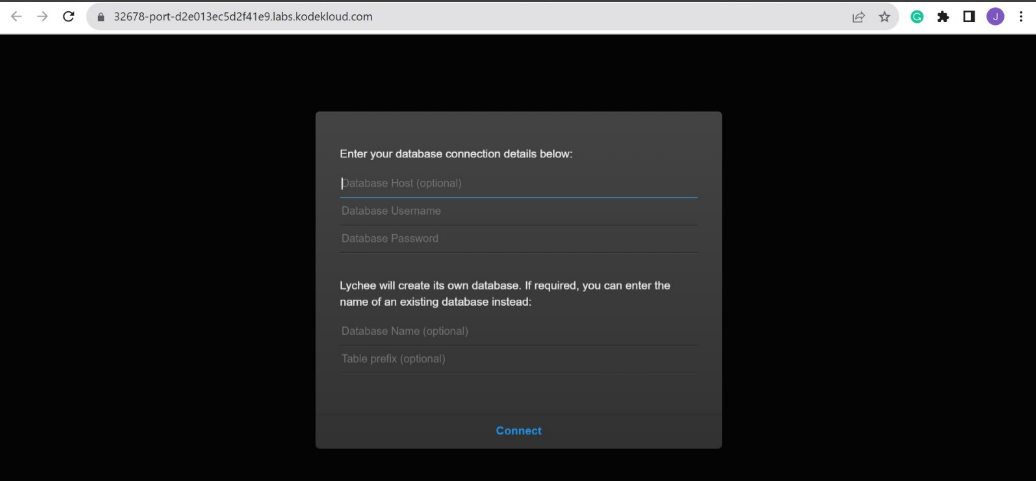
We don't need to make connection b/w database and front-end now, if the installation page is coming up it should be enough for now.
-
The kubectl on jump_host has been configured to work with the kubernetes cluster.
This document focuses on the implementation approach. The task statement in Requirements is preserved as the source requirement.
Prerequisites
- Access to the configured Kubernetes cluster from jump_host.
- kubectl is configured and points to the correct context.
- Use the task-specified namespace, resource names, and images exactly.
Steps
Check the resources.
thor@jump_host ~$ kubectl get ns,pods,deploy
NAME                           STATUS   AGE
namespace/default              Active   5m56s
namespace/kube-node-lease      Active   5m56s
namespace/kube-public          Active   5m56s
namespace/kube-system          Active   5m56s
namespace/local-path-storage   Active   5m48s
Create the deploy.yml.
---
apiVersion: v1
kind: Namespace
metadata:
  name: iron-namespace-xfusion
  labels:
    name: iron-namespace-xfusion
---
apiVersion: apps/v1
kind: Deployment
metadata:
  name: iron-gallery-deployment-xfusion
  namespace: iron-namespace-xfusion
  labels:
    run: iron-gallery
spec:
  replicas: 1
  selector:
    matchLabels:
      run: iron-gallery
  template:
    metadata:
      labels:
        run: iron-gallery
    spec:
      volumes:
        - name: config
          emptyDir: {}
        - name: images
          emptyDir: {}
      containers:
        - name: iron-gallery-container-xfusion
          image: kodekloud/irongallery:2.0
          volumeMounts:
            - name: config
              mountPath: /usr/share/nginx/html/data
            - name: images
              mountPath: /usr/share/nginx/html/uploads
          resources:
            limits:
              memory: "100Mi"
              cpu: "50m"
---
apiVersion: apps/v1
kind: Deployment
metadata:
  name: iron-db-deployment-xfusion
  namespace: iron-namespace-xfusion
  labels:
    db: mariadb
spec:
  replicas: 1
  selector:
    matchLabels:
      db: mariadb
  template:
    metadata:
      labels:
        db: mariadb
    spec:
      volumes:
        - name: db
          emptyDir: {}
      containers:
        - name: iron-db-container-xfusion
          image: kodekloud/irondb:2.0
          env:
            - name: MYSQL_DATABASE
              value: database_apache
            - name: MYSQL_ROOT_PASSWORD
              value: admin123
            - name: MYSQL_PASSWORD
              value: admin123
            - name: MYSQL_USER
              value: kodekloud
          volumeMounts:
            - name: db
              mountPath: /var/lib/mysql

---
apiVersion: v1
kind: Service
metadata:
  name: iron-db-service-xfusion
  namespace: iron-namespace-xfusion
spec:
  type: ClusterIP
  selector:
    db: mariadb
  ports:
    - port: 3306
      targetPort: 3306
      protocol: TCP
---
apiVersion: v1
kind: Service
metadata:
  name: iron-gallery-service-xfusion
  namespace: iron-namespace-xfusion
spec:
  type: NodePort
  selector:
    run: iron-gallery
  ports:
    - port: 80
      targetPort: 80
      nodePort: 32678
      protocol: TCP
Apply.
kubectl apply -f .
Check the resources again.
thor@jump_host ~$ k get ns
NAME                     STATUS   AGE
default                  Active   7m14s
iron-namespace-xfusion   Active   46s
kube-node-lease          Active   7m14s
kube-public              Active   7m14s
kube-system              Active   7m14s
local-path-storage       Active   7m6s
thor@jump_host ~$ k get all -n iron-namespace-xfusion
NAME                                                   READY   STATUS    RESTARTS   AGE
pod/iron-db-deployment-xfusion-8576c6fccd-fhf46        1/1     Running   0          56s
pod/iron-gallery-deployment-xfusion-785f55d854-hc9x2   1/1     Running   0          56s

NAME                                   TYPE        CLUSTER-IP     EXTERNAL-IP   PORT(S)        AGE
service/iron-db-service-xfusion        ClusterIP   10.96.92.190   <none>        3306/TCP       56s
service/iron-gallery-service-xfusion   NodePort    10.96.8.209    <none>        80:32678/TCP   55s

NAME                                              READY   UP-TO-DATE   AVAILABLE   AGE
deployment.apps/iron-db-deployment-xfusion        1/1     1            1           56s
deployment.apps/iron-gallery-deployment-xfusion   1/1     1            1           56s

NAME                                                         DESIRED   CURRENT   READY   AGE
replicaset.apps/iron-db-deployment-xfusion-8576c6fccd        1         1         1       56s
replicaset.apps/iron-gallery-deployment-xfusion-785f55d854   1         1         1       56s
To verify, click the App button. It should open a new tab.

In the new tab, we should see:
Verification
- Confirm the required pods/services/deployments/jobs are in the expected state.
- Run kubectl get commands for the affected resource types and namespace.